Add Name and Date in Photo
Add name and date in photo online in three steps: crop your photo, type your name and the date it was taken, and download a 3.5 x 4.5 cm JPG with both printed in a white strip at the bottom, the way UPSC and state PSC forms ask for it.
Name and Date on Photo · Step 1 of 3 · Add your photo
Drop an image to resize
or paste with Ctrl+V · JPG PNG WebP HEIC GIF · max 25 MB
Processed on this device. Nothing is uploaded.
Example
Before and after
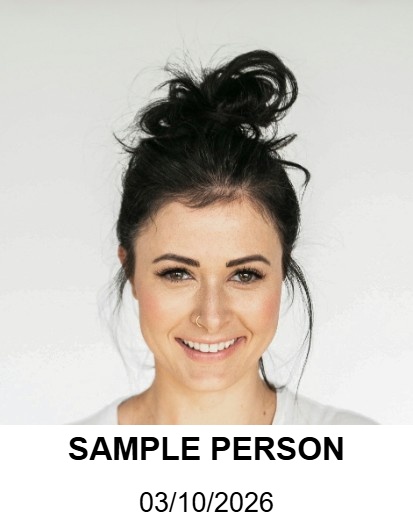
We ran this sample through the name and date on photo tool above. The numbers under each image are measured from the real files.

How to
How to add name and date in photo online
- 01
Add a recent photo
Face straight on, light plain background, taken in the last few days if your notice asks for that.
- 02
Crop and type
Frame your face, then type your name and the date the photo was taken. Today's date is filled in for you.
- 03
Download
A 3.5 x 4.5 cm JPG with the name and date in a white strip at the bottom, ready to upload.
Why this size
Why exams ask for the name and date on the photo
Recent UPSC notices and several state public service commissions ask for the candidate's name and the date of the photograph to appear at the bottom of the photo. It shows the photo is recent and belongs to you, and it is checked again on the admit card and at the exam.
The tool puts your photo above a white strip, so nothing covers your face, and writes the name in bold with the date below it. The result is 413 x 531 pixels (3.5 x 4.5 cm at 300 DPI), the passport size most PSC forms print. UPSC now wants at least 550 pixels on each side, so for UPSC take the photo into the UPSC photo resize page next and drag its frame out to the edges of the picture, so the name and date stay in: it saves the whole picture at 630 x 810 pixels.
| Part | Value |
|---|---|
| Photo size | 3.5 x 4.5 cm |
| Pixels | 413 x 531 px |
| Strip | Bottom 20% of the photo |
| Line 1 | Your name, bold |
| Line 2 | Photo date, DD/MM/YYYY |
Tips
Tips that make a difference
- 1.
Use the date the photo was taken. Not the date you apply. Some notices also require the photo to be taken within a set number of days before the application.
- 2.
Check your notice. Exams that want a name and date usually describe where they go. If your notice gives different wording, type it exactly as asked.
- 3.
Then finish the form files. Take this photo into the UPSC page or the Exam Kit to match the exam's pixel size and KB range along with your signature.
FAQ
Name and Date on Photo: questions
Checked
How we checked this page
Checked by the SizePort team on .
We compare every size and rule on this page with the official sources below, and test the tool with sample photos before it goes live. Rules and platforms change, so if something here is out of date, tell us and we will correct it.
How the tool works
The tool scales your image once, from the original pixels, to the size you set at 300 DPI, and writes 300 DPI into the file so it prints at that size. It then compresses the JPG only as far as needed to stay under the KB limit. Everything happens in your browser; your images are never uploaded.